Business analysis

Discover the right needs. Deliver the right outcomes.

Requirements decomposed, prioritised and traced to the projects and cases that carry them, the clauses they satisfy and the changes they cause. Records, not documents.

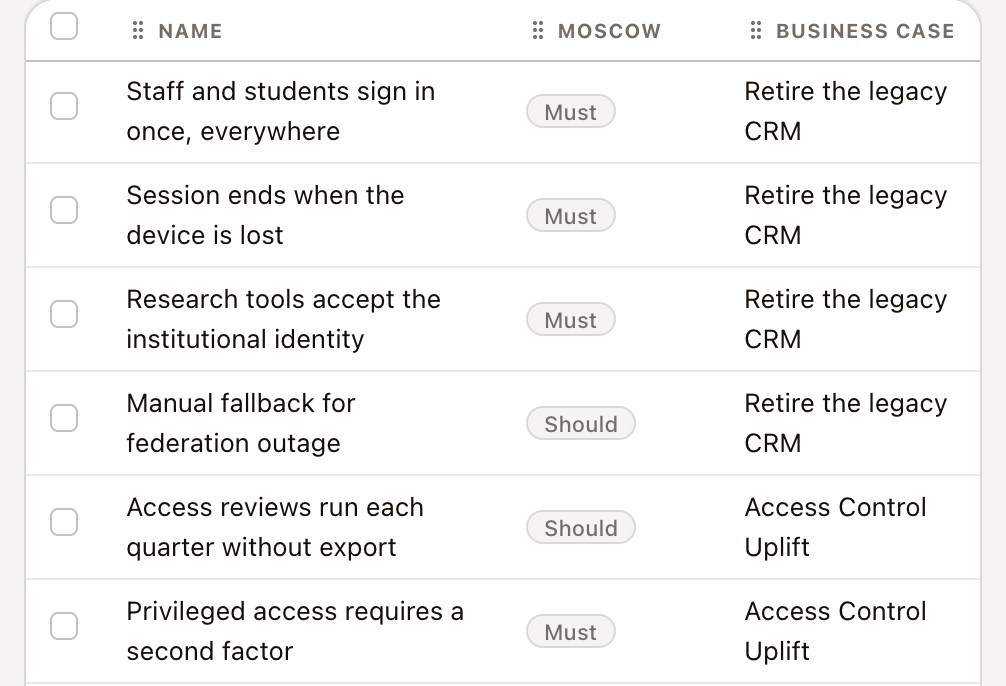
The requirement register at true size: each requirement with its state and level, and the MoSCoW band, type and parent requirement in the columns beside them
Requirements · the register · state and level on every row, band, type and parent beside them · demo environment, 1:1

Staff and students sign in once, everywhereFact Sheet

LevelFeaturesix levels, epic to detail
MoSCoWMustone of four bands
StateApprovedwith its own history
Acceptance8given, when, then

The problem

Not a requirements problem. A connection problem.

Each of these is answerable, just not from a spreadsheet and a Word file that were both out of date before the review.

  • Requirements live in documentsA spreadsheet and a Word file, both already out of date.
  • Traceability is a manual matrixRebuilt by hand for every audit and every release.
  • Acceptance is a paragraphUntestable, so nobody can prove the requirement was met.
  • Change consequences surface lateWhat a change touches is discovered during delivery.

01 / 07

01 · Scope

Assumptions as records, not prose.

In scope, out of scope, assumptions and constraints as individual reorderable records, each classified and owned, so nothing important is buried in free text nobody rereads.

Done byBusiness analystPMO and portfolio leader

The scope and statements section at true size: four in-scope statements, four out of scope, four assumptions and the constraints beneath them, each held as its own record
Staff and students sign in once, everywhere · Scope and statements · in scope, out of scope, assumptions and constraints · demo environment, 1:1
Opens when
A business problem identified, a customer or stakeholder pain point, or an operational issue.
The review
Business need and problem definition.
The decision
  • In scope
  • Out of scope
  • Assumption
  • Constraint
Each statement typed business, technical or commercial.
It writes
What is in, what is out and what we are assuming, each statement its own record.

02 / 07

02 · Definition

Decompose, don't just list.

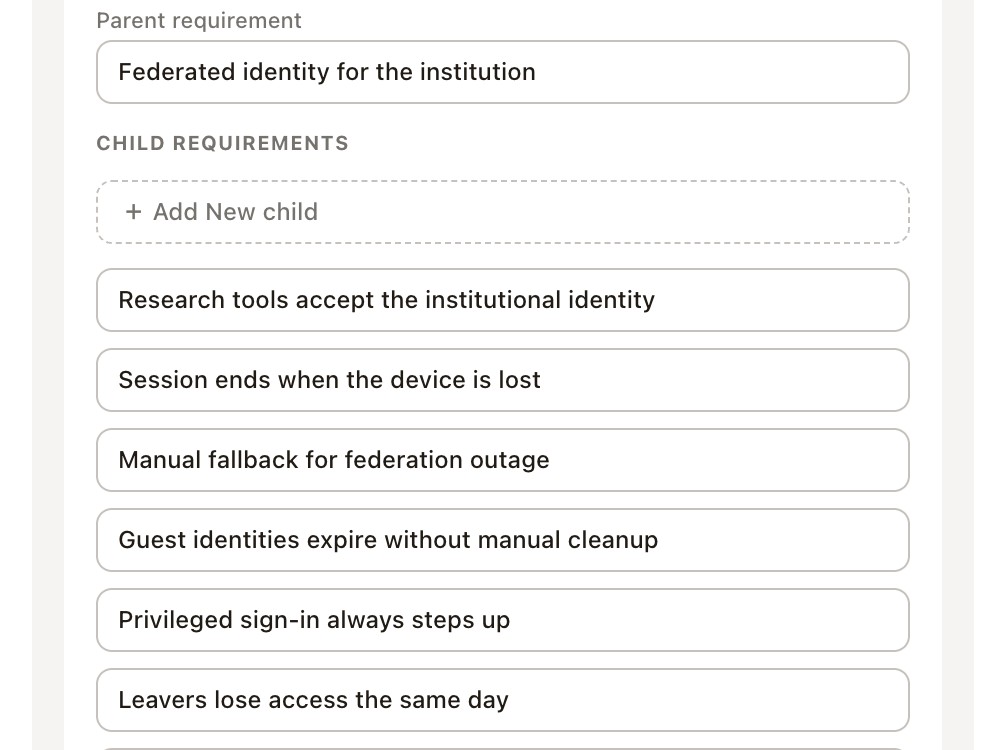
Six levels from epic to detail, nested as deep as the work needs, with the parent requirement above and the children beneath it on the record itself.

Done byBusiness analystEnterprise architect

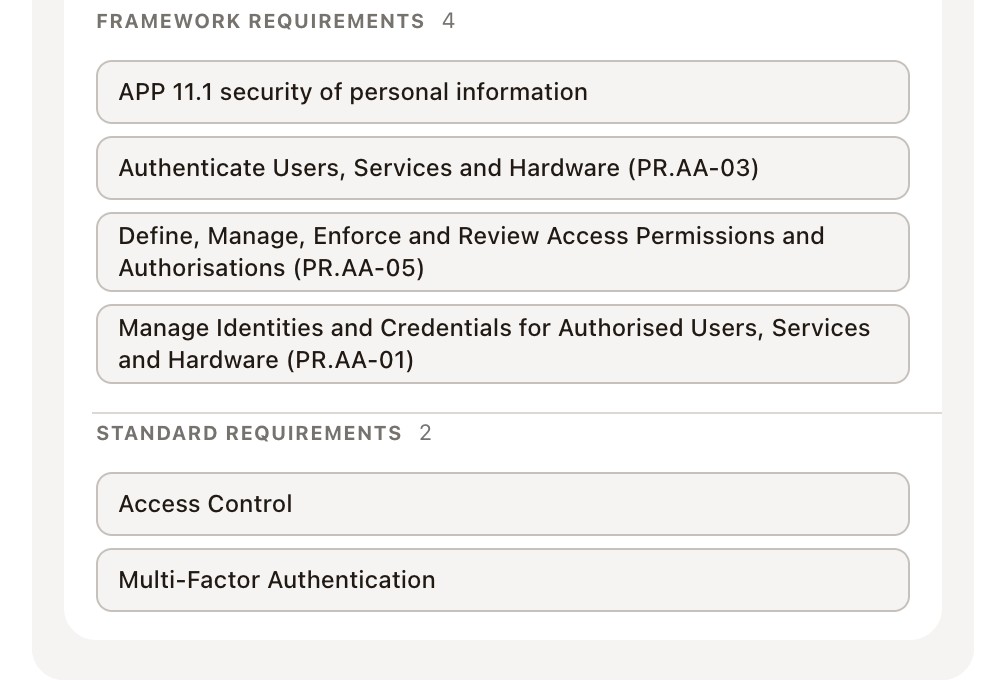
The align and trace section at true size: the parent requirement in a field of its own, and the child requirements listed beneath it
Staff and students sign in once, everywhere · Align and trace · the parent above, the children beneath · demo environment, 1:1
The acceptance criteria section at true size: eight criteria on this requirement, each a titled given, when and then clause
Acceptance criteria · eight clauses · given, when and then · demo environment, 1:1

Written to be tested. Given, when and then as ordered records on the requirement, each with its own test method, so verification is something you can run rather than something you read.

Opens when
A new project or programme, a strategy initiative that needs analysis, or a data or reporting requirement.
The review
Current state discovery, then requirements elicitation and definition.
The decision
  • Epic
  • Feature
  • User story
  • Task
  • Sub-task
  • Detail
The level the requirement is written at, and the parent it decomposes from.
It writes
The requirement at its level, the tree it sits in, and the clauses it will be verified against.

03 / 07

03 · Prioritisation

Say what the case cannot do without.

Must, should, could and won't as columns on a board, so the triage is visible and the decision is a card moved rather than a cell edited.

Done byBusiness analystPMO and portfolio leader

The requirements board at true size, grouped by MoSCoW: could, must, should and won't as columns, each card carrying its state
Requirements · board · grouped by MoSCoW, could, must, should and won't · demo environment, 1:1
Opens when
A process improvement, or an automation opportunity.
The review
Stakeholder and context analysis.
The decision
  • Must
  • Should
  • Could
  • Won't
Drag a card between bands and the record moves with it.
It writes
The band the requirement sits in, on the record rather than in a cell.

04 / 07

04 · Options

Compare, then recommend.

Build, buy or extend, costed over five years with NPV, payback and a weighted decision score across criteria you weight yourself, on the business case the requirements hang off.

Done byBusiness analystEnterprise architectPMO and portfolio leader

Opens when
A vendor or solution assessment, or a system or solution change.
The review
Option analysis and solution shaping.
The decision
  • Build
  • Buy
  • Extend
One option set as today's baseline, one as preferred, with the weighted score behind it.
It writes
Each option costed over the term, the score that ranked it, and the one recommended.
The business case options tab at true size: twelve options, each with its risk ratings, its duration, and its cost, benefit and NPV
Consolidate student administration · Options · twelve costed, each with cost, benefit and NPV · demo environment, 1:1

05 / 07

05 · Impact

See the reach before you commit.

Eleven kinds of record a business case can name, grouped into business, application, technology and vendor layers, each carrying the change that will be written to it.

Done byEnterprise architectBusiness analyst

Opens when
A policy or regulatory change.
The review
Impact assessment and traceability, and process and capability analysis.
The decision
  • No decision here
The reach is established across the business, application, technology and vendor layers before anything is committed.
It writes
Every record the case names, with the change that will be written to it.
The business case impact tab at true size: business contexts, business capabilities, organisations and applications the case names, each a record with a line saying what changes for it
Consolidate student administration · Impact · contexts, capabilities, organisations and applications, each a named record · demo environment, 1:1

06 / 07

06 · Sequence

Order the change safely.

Typed dependencies between changes, what this one waits on and what it blocks, across data, integration, runtime, build and time, with cycles refused before the row saves.

Done byEnterprise architectBusiness analyst

The change's sequence section at true size: eighteen dependencies waited on and nine blocked, each row with its direction, the change, its type, whether it is required, and a note saying why
Retire the on-premises directory · Sequence · eighteen waited on, nine blocked, each typed and marked required or optional · demo environment, 1:1
Opens when
A change request during delivery.
The review
Delivery support and outcome review.
The decision
  • Waits on
  • Blocks
Typed data, integration, runtime, build or time, and marked required or optional. A cycle is refused before the row saves.
It writes
The order the change has to run in, and why each step waits.

07 / 07

07 · Approval

Approved is a version, not a status.

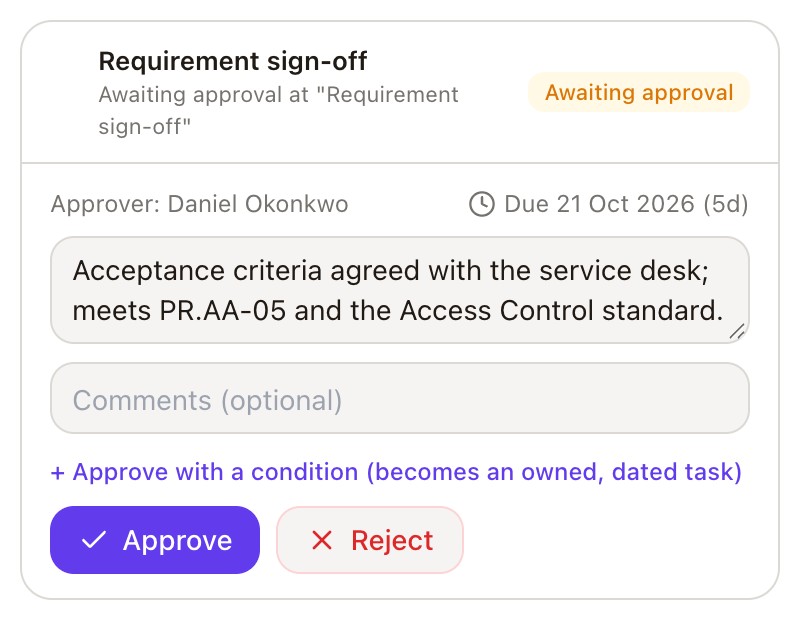
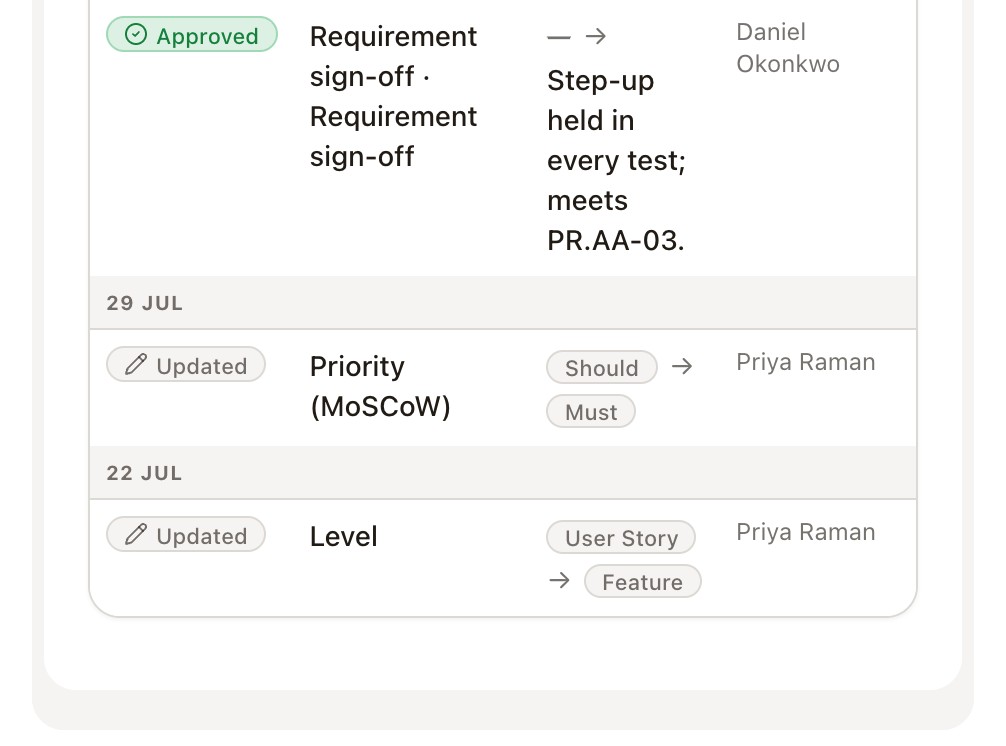
A requirement moves from draft to review to approved through the workflow, with the approver and the date recorded, then it is published and linked to delivery work.

Done byBusiness analystPMO and portfolio leaderEnterprise architect

The requirement's workflow tab at true size: the requirement approval at stage three of four, in review, awaiting approval, with the sign-off due on 2 October, a rationale field, approve with a condition, and approve or reject
Staff and students sign in once, everywhere · Workflow · requirements sign-off, stage three of four, awaiting approval · demo environment, 1:1
Opens when
A requirement ready to be baselined, or a change to one already approved.
The review
Requirements governance and approval.
The decision
  • Approve
  • Approve with a condition
  • Reject
A condition becomes an owned, dated task.
It writes
The approver, the date and the rationale. A change after approval is a new version on the same record.

Everything it does

The whole module, grouped by the step it serves.

Every line is a surface that exists today. Nothing here is on a roadmap.

01 Scope

  • In scope, out of scope, assumptions and constraints as records
  • Each statement classified business, technical or commercial
  • Reorderable, and owned
  • Business need and problem definition

02 Definition

  • Six levels: epic, feature, user story, task, sub-task, detail
  • The parent requirement, and the children beneath it
  • Given, when and then as ordered records
  • A test method on every criterion
  • State, level, band, type and parent on every row
  • Current state discovery
  • Requirements elicitation and definition

03 Prioritisation

  • Must, should, could and won't as columns
  • A card moved between bands, not a cell edited
  • Stakeholder and context analysis

04 Options

  • Build, buy or extend, costed over five years
  • NPV, payback and a weighted decision score
  • Criteria you weight yourself
  • Option analysis and solution shaping

05 Impact

  • Eleven kinds of record a business case can name
  • Business, application, technology and vendor layers
  • The change that will be written to each one
  • Impact assessment and traceability
  • Process and capability analysis

06 Sequence

  • Typed dependencies: data, integration, runtime, build and time
  • What a change waits on, and what it blocks
  • Required or optional, with a note saying why
  • Cycles refused before the row saves
  • Delivery support and outcome review

07 Approval

  • Draft, review and approved through the workflow
  • The approver and the date on the record
  • Approve, approve with a condition, or reject
  • A condition becomes an owned, dated task
  • A change after approval is a new version
  • Requirements governance and approval

The questions buyers ask.

  • In one register, as records rather than documents. A requirement has a state, an owner and a history, so the trusted version is the record and the changes are on it.

From requirement to real outcome.

It runs inside your Microsoft environment, on your data, under your controls.